If you are one of us who are adapting to the 2024 version of D&D (D&D 5.5), Tales of the Valiant, or some other RPG you are finding that your old spell cards need to be updated. I made these without any symbols so you can use different colored cards for different classes, or school of magic, or any way that makes sense for the game you are playing.
These cards are 2 1/2″ x 3 1/2″, 10 cards on an 8 1/2″ x 11″ sheet. Each PDF file has 2 pages. The first page has 10 cards you can fill in with the spell info, and the second page has the 10 colored backs.
They are 8 1/2″ x 11″ so they are easy to print and to find backings or plastic sleeves to fit them in.
I oriented them with the long dimension horizontally to make it easier for the DM to see over.
I only listed information that might be needed during play – so no player creation or dungeon creation information.
Update #1: 4/27/2025 Enlarged the text size in “Weapon Options.”
Let me know what you think about this new ToV DM Screen in the comments below.
Comparing the Tales of the Valiant Monster Vault to the Dungeons and Dragons (2014 and 2025) Monster Manuals.
This is an overview of the Tales of the Valiant Monster Vault. Refer to my post 5.5 Monster Manual Reviewfor a more in-depth review of the new D&D Monster Manual. Tales of the Valiant is a roleplaying game (RPG) published in 2024 by Kobold Press. It includes material taken from the System Reference Document 5.1 (“SRD 5.1”) by Wizards of the Coast. The SRD 5.1 is licensed under the Creative Commons Attribution 4.0 International and is is compatible with the fifth edition of Dungeons & Dragons. Both the new D&D Monster Manual and the Tales of the Valiant Monster Vault were published as upgrades to the D&D Monster Manual that was published in 2014. They are both intended to be compatible with D&D 5E which was published in 2014. The Monster Manual was published as one of the three core rulebooks that were upgraded in 2014; the Players Handbook, the Dungeon Master’s Guide and the Monster Manual.
Using Monsters
2014 Monster Manual (5E MM)
The 5E MM has an 8 page Introduction explaining what a monster is, where they live and how to read the stat block.
2025 Monster Manual (5.5 MM)
The 5.5 MM has 5 pages mainly explaining how to read the stat block.
The Tales of the Valiant Monster Vault (ToV MV)
Chapter 1: Using Monsters is 10 pages with lots of information on building challenging encounters based on the party’s level and the monsters Challenge rating. With several tables based on the number of PCs and their level. And lots of information on customizing combat and modifying monsters. Chapter 2: Understanding Monster Statistics adds another 10 pages expounding on the monster’s stat block. Chapter 3: Understanding Terrain and Creature Types is 21 pages filled with tables and descriptions.
Number & Location of Stat Blocks
NOTE: the following counts are my own. I apologize in advance for any inaccuracies.
5.5 MM
Contains 504 stat blocks. The Main Section The main section contains 408 creature stat blocks. On page 374 of the 5.5 MM there is a Stat Block Conversion table that lists 69 creatures whose stat blocks were in the 5E MM and don’t appear in the 5.5 MM. These are all creatures that either had their name changed or have been removed. For each, a different monster with the same CR is listed that could be used in place of the older monster. Creatures in 5E MM that are not in 5.5 MM: Deep Gnome, Drow, Drow Elite Warrior, Drow Mage, Drow Priestess of Lolth, Duergar, Green Blue Indigo and Violet Faerie Dragons, Lizardfolk, Orc, Orc Eye of Gruumsh, Orc War Chief, Orog, Half-Elves, and Half-Dragons. They changed some other creatures from humanoid to a different creature type, specifically: Aarakocra, Goblins, Hobgoblins, Bugbears, Bullywugs, Githyanki, Githzerai, Grimlocks, Kuo-toa, Gnolls, Jackalwere, Kenku, Kobolds, and Lizardfolk. There are 55 others where the name was changed. Some examples: The Androsphinx was renamed Sphinx of Valor. The Gynosphinx was changed to Sphinx of Lore. The Half-Ogre (Ogrillon) was renamed Ogrillon Ogre. The Poisonous Snake was renamed Venomous Snake. And the Quipper was renamed Piranha. Appendix A: Animals Contains 96 stat blocks for animals including and fantastic variants of animals. Note that dinosaurs have been moved out of the main section of the book and into this appendix where they are listed alphabetically, mixed in with the other animals. AppendixB: Nonplayer Characters This appendix was in the 5E MM but has been removed from the 5.5 MM. Each of the 35 NPC stat blocks are now listed, grouped by type and those groups sorted alphabetically, in the main section of the book. It has all the NPCs that are in the 5E MM and has added Pirates: Pirate, Pirate Captain, and Pirate Admiral. It also added Performers: Performer, Performer Maestro, and Performer Legend. To Berserker it added Berserker Commander. To Cultist it added Cultist Hierophant, Aberrant Cultist, Death Cultist, Elemental Cultist, and Fiend Cultist. To Guard it added Guard Captain. To Knight it added Questing Knight. To Noble it added Noble Prodigy. To Priest it added Priest Acolyte and Archpriest. To Scout it added Scout Captain. To Spy it added Spy Master. To Thug it added Tough Boss. It changed the name of Wild Warrior to Warrior Infantry and added Warrior Veteran, and Warrior Commander.
ToV MV
Contains 419 stat blocks. The Main Section Contains 302 creature stat blocks. 229 of these creatures are also in the 5E MM. Some of the creature names have changed, and the stats have all been revised, some more heavily than others. Similar to 5E MM, they are arranged alphabetically by creature type, so all Dragons are listed together, all Dinosaurs are listed together, etc. Notably, the creatures listed under “Oozes” in the 5E MM are listed separately in the ToV MV. There are 95 creatures that were in the main section of the 5E MM but are not in the ToV MV. This is primarily because they were left out of the SRD and are considered exclusive property of Wizards of the Coast. They are: Aarakocra, Banshee, Beholder, Death Tyrant, Spector, Needle blight, Twig blight, Vign blight, Bullywug, Cambion, Carrion Crawler, Crawling Claw, Cyclops, Demilich, Barlgura Demon, Chasme Demon, Goristro Demon, Manes Demon, Shadow Demon, Yochlol, Spined Devil, Allosaurus, Pteranondon, Displacer Beast, Dracolitch, Shadow Dragon, Drow Elite Warrior, Drow Mage, Drow Priestess of Loth, Empyrean, Faerie Dragon, Flameskull, Flump, Fungi, Gas Spore, Galeb Duhr, Dao, Marid, Fomorian, Githyanki Warrior, Githyanki Knight, Githzerai Monk, Githzerai Zerth, Gnoll Pack Lord, Gnoll Fang of Yeenoghu, Hobgoblin Warlord, Grell, Half-Dragon, Helmad Horror, Hook Horror, Intellect Devourer, Jackalwere, Kenku, Winged Kobold, Kuo-Toa, Kuo-Toa Archpriest, Kuo-Toa Whip, Pentadrone, Mud Mephit, Smoke Mephit, Mind Flayer, Mycolid Sprout, Mycolid, Quaddoth Spore Servant, Nagam Bone, Nothic, Half-Ogre, Orc Eye of Gruumsh, Orog, Peryton, Piercer, Pixie, Quaggoth, Young Remorhaz, Revenat, Fire Snake, Scarecrow, Slaad Tadpole, Slaad Red, Slaad Blue, Slaad Green, Slaad Grey, Slaad Death, Thri-Kreen, Troglodyte, Umber Hulk, Water Weird, Yeti, Adominable Yeti, Tuan-Ti Abomination, Tuan-Ti Malison, Tuan-Ti Pureblood, Arcanaloth, Mezzoloth, Nyaloth, Ultroloth, and Beholder Zombie. The main section of the ToV MV contains 64 new (unique) creatures. They are: Astral Destroyer, Balara, Chol, Uulgol, Icthol, Trillipol, Crimson Jelly, Deathless, Golmana Demon, Husk Demon, Mire Fiend, Unska Demon, Wrack Demon, Derro, Void Eater Derro, Velociraptor, Void Dragon Wyrmling, Young Void Dragon, Adult Void Dragon, Ancient Void Dragon, Yellow Dragon Wyrmling, Young Yellow Dragon, Adult Yellow Dragon, Ancient Yellow Dragon, Scorch Drake, Feral Hunter, Fey Guardian, Flinderbeast, Hinn (Genie), Sila (Genie), Necrophage Ghast, Dirgesinger Giant, Hobgoblin Conjurer, Morlock, Ambush Hag, Hippocampus, Hivebound, Infernal Champion, Insatiable Brood, Swiftblade Kobold, Tinkerer Kobold, Witch Kobold, Lantern Hagfish, Virtuoso Lich, Living Colossus, Moon Knight, Mordovermis, Nimbostratus Spirit, Robot Drone, Robot Warden, Satarre, Satarre Destroyer, Selang, Void Piper Selang, Selkie, Skullbloom Sporeborn, Bloatblossom Sporeborn, Star Crow, Vampire Thrall, Voidling, Lesser Voidling, Wickerbeast, Wood Herald, and Wyrdling. Appendix: Animals This contains 91 stat blocks. The 5 dinosaurs are under “Dinosaurs” in the main section. It contains all the animals in Appendix A: Miscellaneous Creatures of the 5E MM. It changed the name of the Giant Toad to Giant Poisonous Frog and added a Seal. Appendix: NPCs This contains 26 stat blocks. This includes all the NPCs that were in the 5E MM and adds: Archdruid, Bard, and Mechanist (a new ToV character class).
What’s New?
5.5 MM
Monster Tables Many of the monsters include a table for inspiration on why the creature might be there or what it may be doing. Stat Block Conversions: Lists every monster that was in the 5E MM that isn’t in the 5.5 MM. Even if it was just a name change, this list tells you the name of the monster in this book you can substitute for the old one. Monster by Habitat: The habitats are: Any, Arctic, Coastal, Desert, Forest, Grassland, Hill, Mountain, Swamp, Underdark, Underwater, and Urban. Monsters by Creature Type: The creature types are: Aberration, Beast, Celestial, Construct, Dragon, Elemental, Fey, Fiend, Giant, Humanoid, Monstrosity, Ooze, Plant, Undead, Monsters by Group: The groups are: Angles, Beholders, Demons, Devils, Dinosaurs, Dragons (Chromatic), Dragons (Metallic), Genies, Goblinoids, Lycanthropes, Titans, and Yugoloths. Monsters by Challenge Rating: List all the monsters sorted by CR.
ToV MV
Chapter 1:Using Monsters is 10 pages with lots of information on building challenging encounters based on the party’s level and the monsters Challenge rating. With several tables based on the number of PCs and their level. And lots of information on customizing combat and modifying monsters. Chapter 2:Understanding Monster Statistics adds another 10 pages expounding on the monster’s stat block. Appendix: Creatures by Challenge List all the monsters sorted by CR. Appendix: Creatures by Tag (called Group in 5.5) Creatures tags are: Animal, Golem, Outsider, Outsider (Angel), Outsider (Demon), Outsider (Devil), Shapechanger, or Shapechanger (Lycanthrope). Appendix: Creatures by Terrain (called Habitat in 5.5) Terrain types are: Any, Arctic, Badlands, Coastal, Desert, Farmland, Forest, Grassland, Hills, Mountain, Planar, Swamp, Underground, Underwater, and Urban.
The Stat Blocks
Example 5E MM Stat Block
This is the Unicorn stat block from the 5E MM. If you have been playing fifth edition D&D you are probably familiar with this stat block format. I picked this as a typical stat block of a monster that is in all three Monster Books, the 2014 Monster Manual (5E MM), 2025 Monster Manual (5.5 MM), and the Tales of the Valiant Monster Vault (ToV MV).
Example 5.5 MM Stat Block
This is the Unicorn stat block from the 5.5 MM. The stat blocks have all been gone over and changes were made. For the most part, the monster names and CR have remained the same, but all of the monster stats were modified as needed to make all monsters of a CR do similar amounts of damage and be about the same when it comes to how hard they are to defeat. The descriptions were made shorter and easier for the DM to use during combat. For example, in the Unicorn stat block the description for the action Hooveshas been changed from: “Hooves.Melee Weapon Attack: +7 to hit, reach 5 ft., one target. Hit: 11 (2d6+4) bludgeoning damage.” to “Hooves.Melee Attack Roll: +7, reach 5 ft. Hit: 11 (2d6 + 4) Bludgeoning damage.” The 5.5 stat block is laid out in basically the same format as the 5E stat block, but you will notice some differences. First, beside the AC there is “Initiative +8 (18).” This is the monster’s Initiative modifier followed by the monster’s Initiative score in parentheses. You can add the modifier to your monsters roll for the monsters initiative, or you can just use the number in parentheses. The most obvious change is in the ability score block. In the 5.5 stat block, for each ability it lists the modifier and its saving throw modifier. In the 5E stat block it simply lists each ability score and it’s modifier. In the 5E stat block if the monster has any saving throw modifiers that are different from the abilities modifier there is a separate list of those below the abilities block. For example, in the Shadow Demon stat block it says “Saving Throws: Dex +5, Cha +4.” Resistances, Vulnerabilities and Immunities lists have been simplified. For example, in the Unicorn stat block you can see that instead of Damage Immunities and Condition Immunities, the 5.5 stat block just lists “Immunities Poison; Charmed, Paralyzed, Poisoned.” Note the semicolon separating the Damage Immunities from the Condition Immunities. The Proficiency Bonus (PB) is shown after the XP. The following section is now labeled “Traits.” The list of traits are often changed. “Innate Spellcasting” has been moved into the “Actions” section and renamed “Spellcasting.” In most of the stat blocks the list of spells has been shortened and/or the list has changed somewhat. This is typically how spellcasting is handled. Here are some of the other changes in this example: “Charge” and “Magic Weapons” was removed from Traits, and “Legendary Resistance (3/Day)” was added. The “Horn” action was replaced with the “Radiant Horn” action that does a little more damage of a different type (radiant instead of piercing). “Teleport (1/Day)” was removed. The action “Healing Touch (3/Day)” was replaced by the bonus action “Unicorn’s Blessing (3/Day).” The legendary actions “Hooves” and “Heal Self (cost 3 Actions)” were removed. The legendary action “Charging Horn” was removed. The legendary action “Shimmering Shied (Cost 2 Actions)” changed to “Shimmering Shield” and it now gives temporary hit points in addition to adding 2 to the targets AC.
Example ToV MV Stat Block
This is the Unicorn stat block from the ToV MV. Like in the 5.5 MM, the stat blocks for monsters that are in the 5E MM, the monster names and CR have remained the same but the monster stats are modified as needed to make all monsters of a CR do similar amounts of damage and be about the same when it comes to how hard they are to defeat. Challenge Rating (CR). This has been moved to the top. To the right of the monster’s name. Experience Points (XP). The ToV MM stat block does not list the monster’s XP. The book does have a table showing Experience Points by Challenge Rating. Alignment. The ToV game doesn’t use Alignment at all, so the monster’s stat bocks do not include the monster’s alignment. Armor Class (AC). The AC is calculated using this formula: AC = 10 + DEX modifier + any additional bonuses (from equipment, natural armor, or special traits). Note that the AC is calculated before the PB is added to the ability modifiers (refer to abilities below). Hit Points. Most (possibly all?) monster’s hit points have been revised to more closely align with their CR. In this example they were increased from 67 to 92. Perception. ToV adds this to the stat block. It is calculated using this formula: Perception Value = 10 + WIS modifier. To successfully hide from this monster, the PC’s DEX (Stealth) check must be equal to or higher than this value. Stealth. ToV adds this to the stat block. It is calculated using this formula: Stealth Value = 10 + DEX modifier + some creatures add their PB or double their PB. When a creature attempts to hide, it doesn’t make a hide check, instead it used its stealth value. When trying to detect signs of a creature, the PC’s WIS (Perception) check must be equal to or higher than the creature’s stealth score. For example: A PC’s WIS (Perception) check result must be a 12 or better to detect the Unicorn when it is trying to hide from the PC. Abilities. The ToV stat block shows the ability modifier and doesn’t show the ability score. Unlike 5E, or 5.5, the Proficiency Bonus (PB), which is based on the monster’s CR, is already included in this modifier so you use the ability modifier that is shown when making an ability check or save. In the example stat block shown here, the PB has been added to the WIS and CHA modifiers. Vulnerable, Resistant, and Immune. As in the new 5.5 MM, these lists have been simplified. Spellcasting. For creatures that have the spellcasting ability, this has been moved to be listed as an action and the lists has been shortened to list only the spells most likely to be used during combat. In some cases some (or all) the spells have been removed and replaced with magical actions. On the Unicorn example: detect evil and good has been replaced with the Sense the Unnatural trait, pass without trace has been replaced with the Woodland Walk trait, druidcraft has been moved into the Unicorn Magic action which also adds the dancing lights cantrip, the other spells (calm emotions, dispel evil and good, and entangle) have been removed. Here are some of the other changes in this example: The Chargetrait was removed. The Celestial Resilience, and the Speak with Beasts and Plants traits were added. The Hooves action was removed. The damage was increased on the Hornaction. The Horn Bolt action was added (this gives the Unicorn a ranged attack). The Teleport (1/Day) action was removed. Shimmering Shield was removed as a legendary action and became a reaction. The legendary action Hooveswas removed. The legendary actions Canterand Radiant Stomp were added.
Final Thoughts
When I started writing this review I was expecting to unconditionally recommend the Tales of the Valiant Monster Vault (ToV MV) over the 2025 version of the Dungeons and Dragons Monster Manual (5.5 MM). However, after a closer look at both of them it’s not that easy. First, let me say that if you are currently using the 2014 Monster Manual (5E MM) and are wondering if switching to one of these would be an improvement, the answer in my opinion is yes. Even though they differ in many specific details they have both done a good job in making the Difficulty Class (DC) for the monsters avoid most of the wild fluctuations they have in the 5E MM, making the creation of balanced encounters an easier task for the DM.
5.5 MM
By my count, the 5.5 MM has 85 more stat blocks than the ToV MV. So if you are looking for the most number of monsters you can’t go wrong with the 5.5 MM. It doesn’t have monster stats for Orcs, Drow or Duerger but you can still use your old Monster Manual for those. The other creatures that were humanoid in the 5E MM have changed to a different creature type. Refer to my post 5.5 Monster Manual Review for more of my thoughts on the 5.5 MM.
ToV MV
ToV MV suffers from not being able to use any of Wizards of the Coast’s proprietary monsters, so you will need to continue using your 5.5 MM for those. But it does have a much larger number of new monsters to surprise your players with. Kobold Press has been publishing great monsters for several years and they are very good at it. I think you will love these new monsters. Also, I personally think that they did a better job in the changes they made to the existing monsters. ToV MV does a good job explaining how to create a balanced encounter. It even has a table that shows, for each creature, its common allies. This is a great tool for coming up with a boss monster and its minions. It also has a lot of small things that are useful, such as a pronunciation guide for every creature. ToV MV has not changed the creature type of the humanoid creatures. I prefer the organization of the ToV MV to the 5.5 MM. For instance, I like having all the dragons together.
If you are staying with the 2014 version of D&D there is no reason you couldn’t just stick with the 2014 Monster Manual. But adding either the 5.5 MM or the ToV MV (or both) would not be a mistake. They both offer improvements to the old stat blocks and many new monsters.
If you are switching to the 2024 version of D&D you don’t have to switch monster books. The 2014 Monster manual still works just fine with D&D 5.5. If you decide to switch to the 5.5 MM I recommend that you keep your old MM handy, you may want to still use some of the older monster stats. You could just as easily add the ToV MV for its new monsters and updates to most of the monsters found in the 5E MM.
If you are switching to Tales of the Valiant you will probably want the ToV MV, but you can use the 5E MM if you already have that. It will work seamlessly with ToV. If you do get the ToV MV you might be tempted to also get the new 5.5 MM for updated stats for the WotC proprietary monsters but it’s probably not worth it for just that, especially if you already have access to the 5E MM.
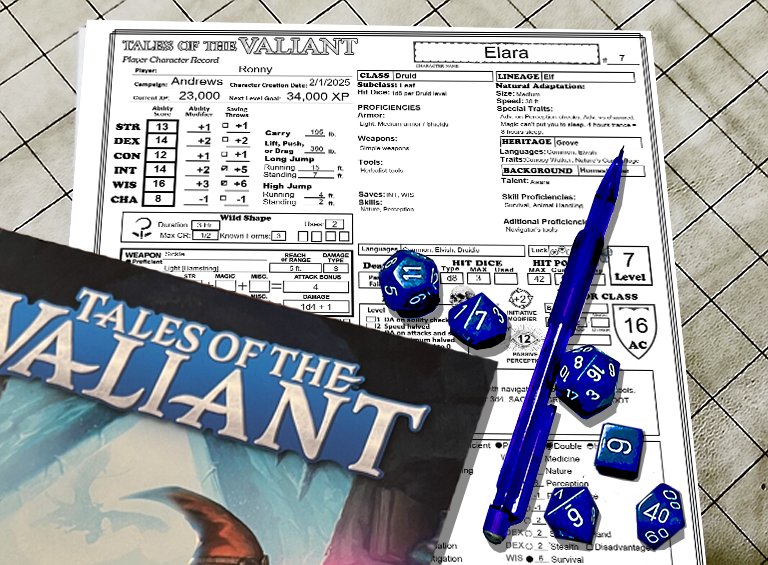
Here is the form fillable ToV Character Sheet you have been waiting for!
In 2015 Wizards of the Coast published the current version of Dungeons and Dragons (D&D 5E). Last year they published an update to the game that they refer to as the 2025 version (I call it D&D 5.5). Last year Kobold Press published “Tales of the Valiant” (ToV). It is also based on D&D 5E and is also an update to that game. If you aren’t familiar with it you should go over to koboldpress.com and get a free copy of the 385 page “Black Flag Reference Document” PDF. It contains everything you need to play ToV. If you like it you can get their equivalent to WotC’s “Player’s Handbook” (PHB), “Dungeon Master’s Guide” (DMG), and “Monster Manual” (MM). ToV calls them the “Player’s Guide” (PG), “Game Master’s Guide” (GMG), and “Monster Vault” (MV).
Last month I posted my updated character sheet for D&D 5.5. This is a similar character sheet specifically for “Tales of the Valiant”.
This incorporates the changes to D&D 5E found in ToV’s “Players Guide”. It is 4 pages, 2 sheets if printed on both sides. (Note that I will be referring to the set of all 4 pages in the singular, as the “character sheet”.) Page one has all of your character’s basic information and all you need for combat other than your spells. Page two is just for equipment and treasure. Page three is Character background and notes. Page four is for magic spells. It can be printed blank and filled out with a pencil, or you can fill in the forms on your device and most of the calculations will be done for you. It automatically calculates; ability and saving throw modifiers, carrying capacity and jump distances, Armor Class, Proficiency Bonus, Passive Perception, Skill check modifiers, Weapon attack bonus and damage, Equipment cost and weight, and more. It can fill in all the adventuring gear you get if you select an equipment pack (such as an “Explorer’s Pack”). In addition to that, it contains a new Autofill option that can fill in all the standard information based on your class, Lineage, Heritage, and Background.
Update #1: 2/9/2025 Minor item cost display fix for Adobe Acrobat For items whose cost is in copper pieces or silver pieces it was displaying their cost in fractions of a gold piece. It now displays their cost in cp or sp if their total cost is less than the next more valuable coin. Adobe Acrobat wasn’t displaying this correctly.
Filling in the ToV Character Sheet
These instructions are for use with the character sheet you can download above. You can print a blank Character Sheet and fill it out by hand. If you fill it out on your device, many boxes will be filled in for you. There is information at the end of this on how to use this sheet for multi-class characters.
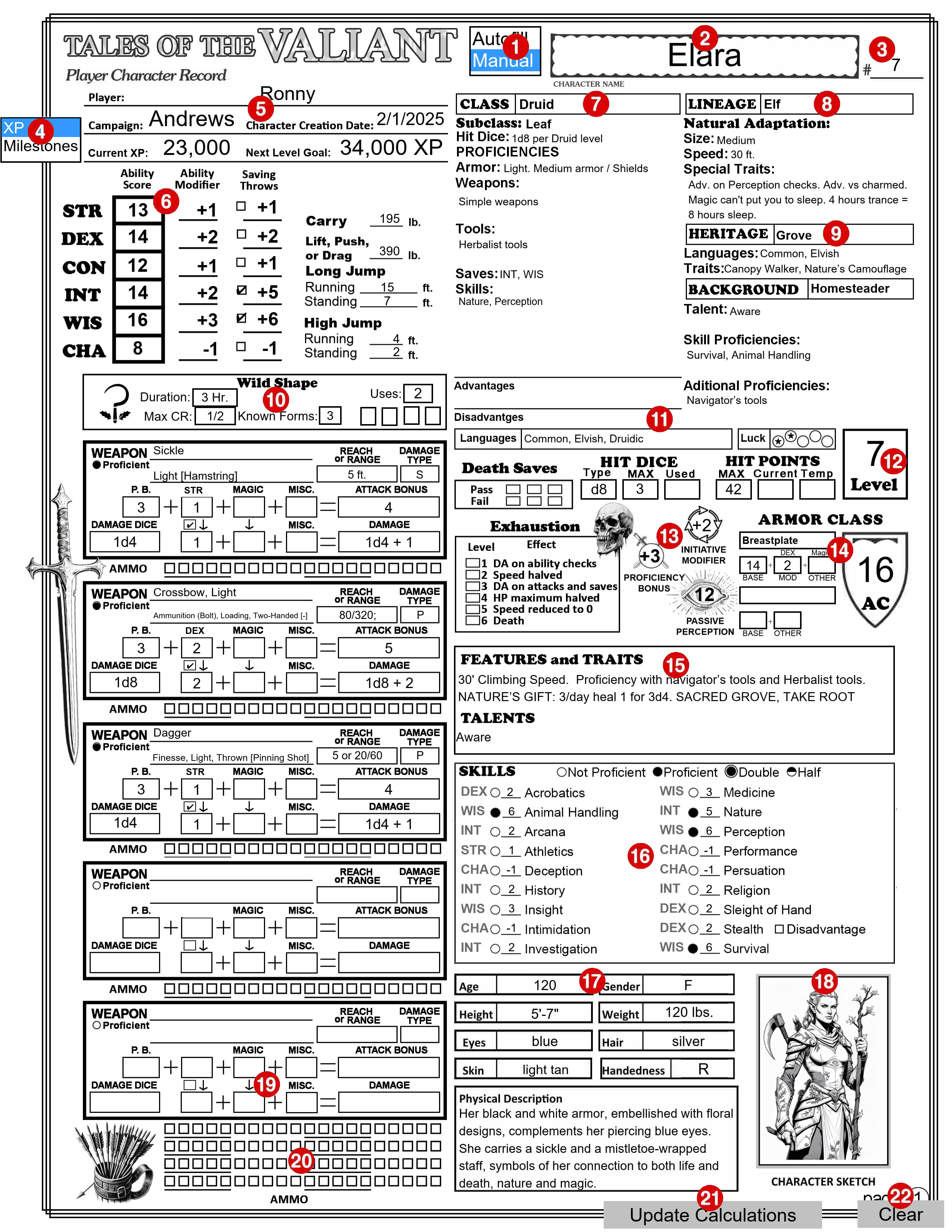
PAGE 1
1 – Autofill/Manual Selection Box
This selection box is independent of the similar one on page 4. Be aware that one page might be set to Autofill and the other one set to Manual. Select ‘Autofill’ mode to automatically fill in portions of this page based on your choices, as described below. Choose ‘Manual’ mode to keep existing information unchanged and make your own edits. CAUTION: If you switch to ‘Manual’ mode to make a few changes and then switch back to ‘Autofill’ mode, all your changes will be lost, replaced by the ‘Autofill’ information. I recommend you leave it in ‘Autofill’ mode until you are finished with Page 1, including your weapons and armor. You can then safely change to ‘Manual’ mode and make changes and additions. You may want to make a backup copy of your sheet before making changes. Each of the numbered sections below where this selection makes a difference will include a description for both Autofill mode and Manual mode. Note: This selection box will not appear on the printed page.
2 – Your Character’s Name
The text you enter here will also appear in the same location on the other pages. The text can be entered or changed on any page.
3 – #____
Character sheet version. If you make multiple copies of your character sheet enter the version number here. Like the Character Name, this text will also appear on the other pages.
4 – XP/Milestones Selection Box
If ‘XP’ is selected the Next Level Goal will be calculated and entered for you here based on your current character level (see below). If “Milestones” is selected the text on this line will be replaced by a “Notes” section. Note: This selection box will not appear on printed pages
5 – Campaign Information
This is where you enter your name, the name of the campaign you are in and the date this character was created. Trust me, if you look back at this years from now, you will appreciate having this information.
6 – Ability Sores
Enter your ability scores in the boxes. All the data to the right of the ability scores will be filled in for you based on the ability scores, including your carrying and jumping stats based on your strength score. Because your long jump distances are based on your walking speed, and there are several ways it might change, I don’t calculate that for you. Check the little box next to the Saving Throw modifier to indicate that you are proficient in that Save.
7 – Class
Select your Class from the drop-down box. The Class Feature box (number 10 below) will display information relevant to this class. Subclass: You can select a subclass from the drop-down menu. Autofill mode: All the information from the Class Features section in the PG for this Class will be filled in, down to (but not including) Starting Equipment. If there is any current text in any of these areas it will be removed. You can also type text into this ‘Class’ box, but if it differs in any way from one of the selections in the drop-down box any text below will be removed. Manual mode: No matter what you select or enter into the “Class’ box, existing text in this section will remain unchanged. You can change or add any text in the ‘Class’ box or any of the information below it.
8 – Lineage
Select your Lineage from the drop-down box. Natural Adaption: Some call this a Sub Lineage. Some lineages (such as the Dwarf) don’t have one. You can type in the name of a Natural Adaption or select one from the drop-down. Autofill mode: An abbreviated version of the size, speed, and special traits for this lineage will be filled in. If there is any current text in any of these areas it will be removed. You can also type text into the ‘Lineage’ box, but if it differs in any way from one of the selections in the drop-down box any text below will be removed. Manual mode: No matter what you select or enter into the ‘Lineage’ box, existing text in this section will remain unchanged. You can change or add any text in the ‘Lineage’ box or any of the information below it.
9 – Heritage and Background
Select your Heritage and Background from the drop-down boxes. Autofill mode: The Languages and Traits for your Heritage will be filled in. Your Talent, Skill Proficiencies and Additional Proficiencies from your Background will be filled in. Manual mode: No matter what you select or enter into the ‘Heritage’ or ‘Background’ box, existing text in these sections will remain unchanged. You can change or add any text in either box or any of the information below them.
10 – Class Feature box
The content of this box will change depending on your character’s Class (number 7). It shows certain traits for the selected class that change based on class level and/or abilities and provides check boxes to track uses of limited use features. If no class is selected, or anything is entered into the Class box (number 7) other than what can be selected from its drop-down box, this will show the default Class Feature box which only shows a stylized die and contains an empty text box where you can enter any notes you may want.
11 – Advantages, Disadvantages, Languages and Luck Points
Enter any types of checks where you get advantage or disadvantage on the role, your known languages and track your luck points.
12 – Level
You must enter your character’s current level in this box.
13 – Proficiency Bonus, Initiative Modifier, Heroic Inspiration, Passive Perception, Death Saves, and Exhaustion, Hit Dice, and Hit Points
Hit Dice Type, Proficiency Bonus, Initiative Modifier and Passive Perception will be calculated and filled in for you. The check boxes in Heroic Inspiration, Death Saves, and Exhaustion are for you to check off as needed during play. You should enter your MAX Hit Dice. The Used Hit Dice, Current and Temp Hit points are for you to use to track them during play.
14 – Armor Class
Select the type of armor you are wearing, or “Unarmored” and select “Shield” or “No Shield”. Your Armor Class (AC) is displayed in the shield symbol. It is your Basic AC + the bonus you get if you have a Shield. The Basic AC is calculated by adding together the values in the three boxes under your armor type (or “No Armor”). Your shield bonus is +2 but if you have a magic shield you can select the bonus from the drop-down menu in the OTHER box under the Shield/No Shield box. Autofill mode: Armor: When you select an armor type the BASE value will be entered in the first box. The MOD value will be filled in with your DEX Modifier if it is Light armor, and your DEX Modifier (max 2) if it is Medium armor, and “None” if it is Heavy armor. The OTHER box is for you to enter any magical + it may have. Unarmored: If you have selected “Unarmored” the BASE will be 10 and MOD will be your DEX Modifier. If your Class is Barbarian the BASE will be 13 and MOD will be your CON Modifier. If your Class is Monk the BASE will be 10, MOD will be your DEX Modifier and OTHER will be your WIS Modifier. If not used otherwise, you can use the OTHER box to enter any other modifier you may get to your AC when unarmored. (If your character is a Sorcerer, the third level feature “Draconic Resilience” gives you an unarmored AC of 13 + your DEX Modifier. This is the only one that isn’t done for you. You will need to switch to Manual Mode to enter that. CAUTION: later switching back to Autofill Mode will replace anything you have entered anywhere on this page while in Manual Mode back to its autofill status. Manual mode: All of these boxes are to be filled in by you. The totals are still added up and show as your AC in the big armor class shield.
15 – Features, Traits and Talents
You can enter any information you want in these text boxes. They are intended for you to list your characters Features, Traits, Talents and any reminders you may want to include.
16 – Skills
The ability modifier to use for each different skill check is listed here. Empty circles indicate your character is not proficient in that skill. Click once on an empty circle to fill that circle, indicating that you are proficient in that skill. Your Proficiency Bonus will be added to your ability modifier for that skill check. Click on the filled circle and a slightly larger circle will be added around the filled one, indicating that you can add double your proficiency bonus to this skill check, and the number will change to reflect this change. Click on this same circle again and it will change to a half-filled circle, indicating that you add only half your proficiency bonus to this skill check and the number will change again. Click on it one more time and it will change back to not proficient. Stealth: To the right of the stealth skill is a checkbox in front of the word “Disadvantage”. This box will automatically be checked as a reminder to you if the type of armor you are wearing gives you Disadvantage on DEX (Stealth) checks. It will automatically be checked if your armor has the “Noisy” property.
17 – Physical Description
Refer to the information on your Lineage, but within those general guidelines your character can look any way that you want.
18 – Character Sketch
If your PDF reader supports it, you can click on the image area and it will pop-up a “Select Icon” menu where you can select an image you have access to. Or just draw a picture of your character in the frame.
19 – Weapons
Select a weapon from the drop-down menu.
Select an Ability from the drop-down above the second column of boxes to will apply that ability’s modifier to the attack bonus. This should typically be STR for melee weapons and DEX for ranged weapons.
Click on the check box between the two boxes below that to also apply that modifier to the damage calculation. You don’t add your ability modifier to the damage when attacking with second weapon in your other hand unless the modifier is negative.
If you have proficiency in the use of this weapon, click on the circle next to “Proficient”. (This will fill in the circle and replace the word “None” in the attack bonus row with the value of your Proficiency Bonus.)
If this is a magic weapon select the magical bonus from either of the drop-downs in that column. The magic bonus will show up in both boxes and be applied to the attack bonus and to the damage.
To add additional modifiers to the attack bonus or to the damage select the modifier from the box in the MISC. column. Autofill mode: The Weapon Properties, Reach and/or Range, and Damage Dice will be filled in for you. On the line under the weapons name, it will list the weapon’s properties and the weapon options (if any) in square brackets. Manual mode: You will have to fill in the Weapon Properties, Reach and/or Range, Damage Type, and Damage Dice boxes.
20 – Ammo Check boxes
For weapons that use ammunition, you can use these boxes to check off your ammunition as it is used.
21 – Update Calculations
All of the information filled in automatically for you should update whenever you make any change. Sometimes it doesn’t. You can press this button to force the form to update all of the calculated fields. Note: This selection box will not appear on the printed page.
22 – Clear
Be careful to not press this unless you want to erase everything from all of the fields on all pages. If you press it by accident, you may be able to recover the lost information if you press CTRL Z. This button is useful for clearing all fields and starting over, or before printing a blank form to fill out by hand. Note: This selection box will not appear on the printed page.
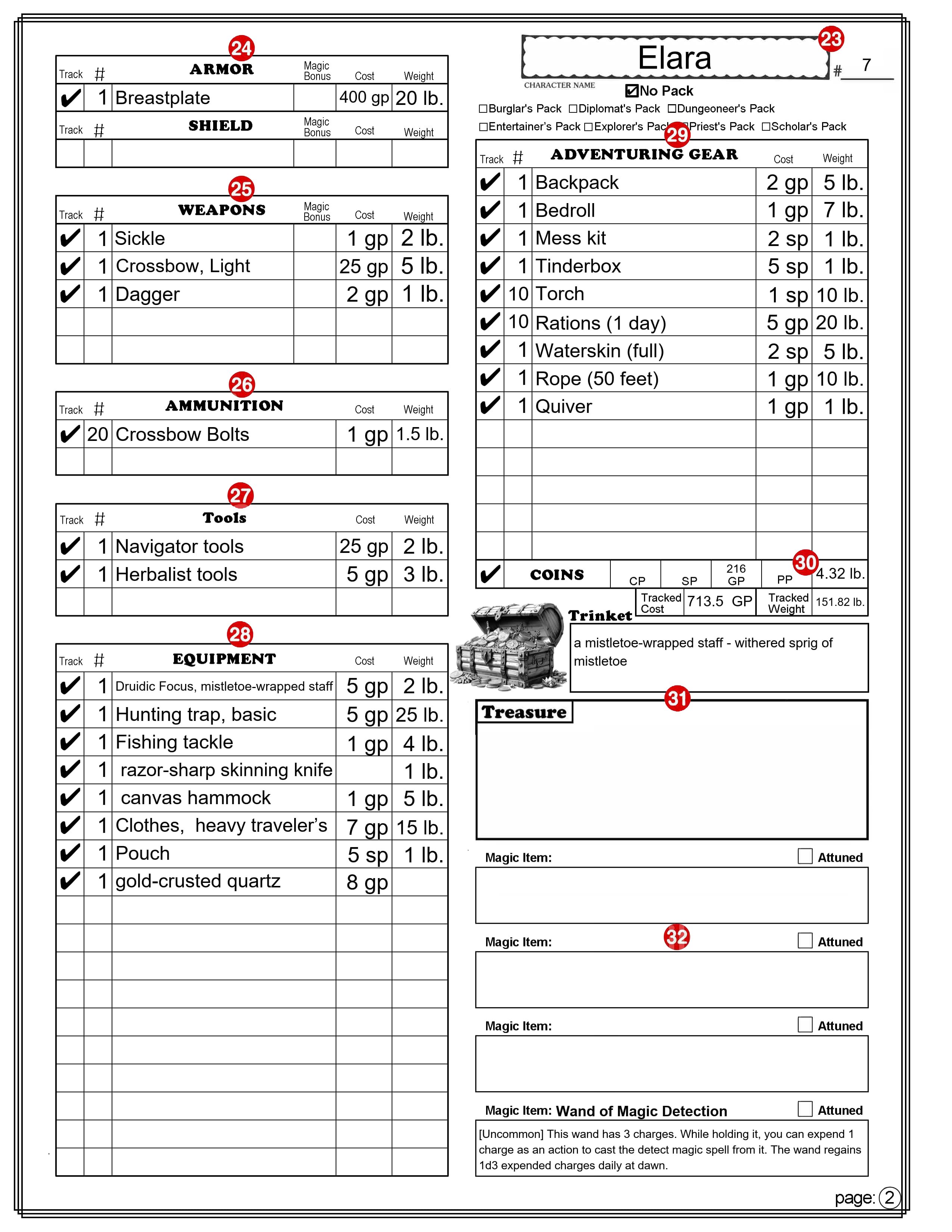
PAGE 2
Note: There is no Autofill or Manual mode for this sheet, although the Adventuring Gear section (number 29) has a “No Pack” option that is similar to Manual mode that only applies to the Adventuring Gear section.
All Equipment Lists
For all items in the Armor, Shield, Weapons, Ammunition, Equipment, and Adventuring Gear sections.
Item Selection: The drop-down will only lists items of the appropriate type. For example: Item selection in the Tools section will only list tools. If you have an item that is not on the drop-down menu, or you want to modify a name, you can type anything you want in the box. (Refer to number 29 for exceptions.) Track: If this box is selected a check mark will appear in the box and the cost and weight of this item will be included in the boxes labeled “Tracked Cost” and “Tracked Weight,” found at the bottom of the “Adventuring Gear” section. #: Number, or quantity. You will need to enter a number in this box for how many of this item you have. If you leave this box empty (it will not display the number 0) the Cost and Weight boxes will remain empty. Magic Bonus: (Only found on the Armor, Shield, and Weapons sections.) You can select a magic modifier to apply to the item from the drop-down menu. Cost: This box will contain the cost of the item. It takes the cost from the PG and multiplies that by the number of items. If the text in the item box doesn’t match exactly any option on the drop-down, no calculations are made and you can enter or change the cost. You can’t enter the cost in cp, sp, or pp. You will need to convert the cost into its value in gold pieces, or fractions of a gp. 1 CP = 0.01 GP, 1 SP = 0.1 GP , 1 PP = 10 GP. Note: If the text in the item box isn’t on the drop-down list, the cost you enter here will ignore the number in the # column. Also note that this is the price of the item. If you later sell the item you will typically only be able to sell it for a maximum of 1/2 its original value. There are some exceptions, such as for gems and coins. Weight: This box will contain the weight of the item (in pounds). It takes the weight from the PHB and multiplies that by the number of items. If the text in the item box doesn’t match exactly any option on the drop-down, no calculations are made and you can enter or change the weight. Note: If the text in the item box isn’t on the drop-down list, it will ignore the number in the # column.
23 – Character’s Name and #____
Character’s Name and Character sheet version (see 2 & 3 on page 1).
24 – Armor & Shield
ARMOR: Select the armor you are wearing (or select “No Armor”). The text here will also appear on page 1 (number 14), and used to calculate your armor class. The text can be entered or changed on either page. If the text here doesn’t match exactly what is on the drop-down menu the AC calculation on Page 1 may be inaccurate. Magic Bonus: This will appear on page 1 as a magic + for any armor, or as OTHER if unarmored. Exception: This value will be ignored when unarmored if your class is Monk. SHIELD: Select “Shield” or “No Shield”. The text here will also appear on page 1 (number 14), and used to calculate your armor class. The text can be entered or changed on either page. If the text here doesn’t match exactly what is on the drop-down menu the AC calculation on Page 1 may be inaccurate. Magic Bonus: This is added as a bonus to your armor class with or without a shield. (It can be changed here or on page 1.)
25 – Weapons
Select your Weapons from the drop down menu. They will appear in the same order here and on page 1 (number 19). The text can be entered or changed on either page. If the text here doesn’t match exactly what is on the drop-down menu the Attack Bonus and Damage for this weapon on Page 1 may be inaccurate. Magic Bonus: This will appear on page 1 as a magic + for the weapon and can be selected on either page.
26 – Ammunition
Select your Ammunition from the drop down menu. Note that the Cost and Weight are calculated based on the cost and weight of one item and most ammunition is sold in bundles of multiple items. So if, for example, you purchase 20 arrows, be sure to enter 20 in the number column to get an accurate cost and weight calculation.
27 – Tools
Select any Tools from the drop down menu.
28 – Equipment
Select Equipment from the drop down menu. You may want to first enter your starting Equipment in the Adventuring Gear section. Both sections contain the same drop-down list of items.
29 – Adventuring Gear
This section is to automate the selection of bundles of items that are available as “Equipment Packs” in the PG, many of which are available options with your chosen background. Selecting a Pack: When you select a pack (by checking the box by the name of the pack) all of the Number, Name, Cost, and Weight boxes in this section will be cleared and replaced with the items available in that pack. As long as one of the packs is selected you can’t make any changes to this list. Selecting “No Pack”: When you select “No Pack” the “Adventuring Gear” section will function exactly the same as the “Equipment” section. It is important to note that this does not clear any of the current information in this section so you could, for example, select the Explorer’s Pack and then select No Pack, leaving all the items that came with the Explorer’s Pack. You could then remove, add or change items as you choose. COINS: The coins section at the bottom of the “Adventuring Gear” section is unaffected by the selection of any Pack. This row is where you can track your money, in the form of CP (Coper Pieces), SP (Silver Pieces), GP (Gold Pieces), and PP (Platinum Pieces). Tracked Cost & Tracked Weight: These show the Totals (in GP and pounds) of all the items you have checked for tracking. This is an easy way to see how much weight you are carrying. You could easily choose to not track items that you have in a bag of holding for example, or items you own but are not currently carrying. Another tip; if you are on a shopping spree, you can select the items you are thinking of buying and only select them to track. That will give you a quick cost total.
30 – Trinket
This is a section where you may want to enter the description of a unique item. It’s cost and quantity will not be tracked.
31 – Treasure
This has two text fields, one for a name like “Treasure from the Dragon’s hoard.” And a largr area for listing multiple items. These will not be tracked.
32 – Magic Items
There is space here to list 4 magic items. There is a field above the box for the item’s name and a larger text field in the box for a description. The check box beside the word “Attuned” can be checked if you are attuned to the magic item. (You can be attuned to no more than a number of items equal to its proficiency bonus (PB) at any one time.)
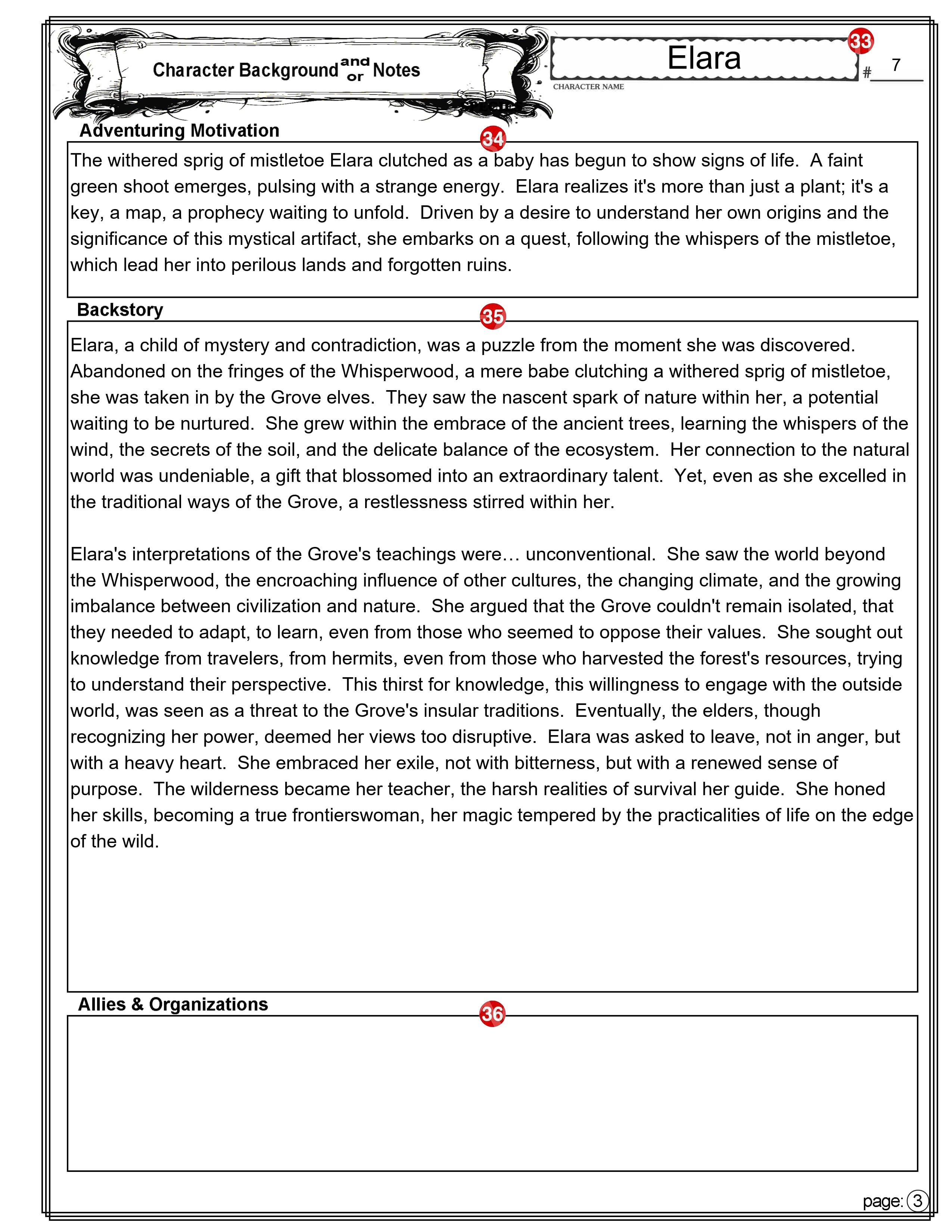
PAGE 3
33 – Character’s Name and #____
Character’s Name and Character sheet version (see numbers 2 & 3).
34 – Adventure Motivation
This is where you can enter the Adventuring Motivation you selected from those suggested by your background, for one you created.
35 – Backstory
Many players like (and some GMs require you) to come up with a character backstory. Players create backstories for their D&D characters to add depth, motivation, and personality to their roles in the game. A well-crafted backstory can enhance roleplaying, provide plot hooks for the GM, and make the character more engaging for both the player and the party.
There is plenty of room here to also add any notes about your character that don’t easily fit elsewhere on the character sheet.
36 – Allies and Organizations
A place to list the names and something about the other Player Characters (PCs) in the game, along with who the character belongs to. There may be organizations in the game world that you want to remember. Some may be friendly and some not.
PAGE 4
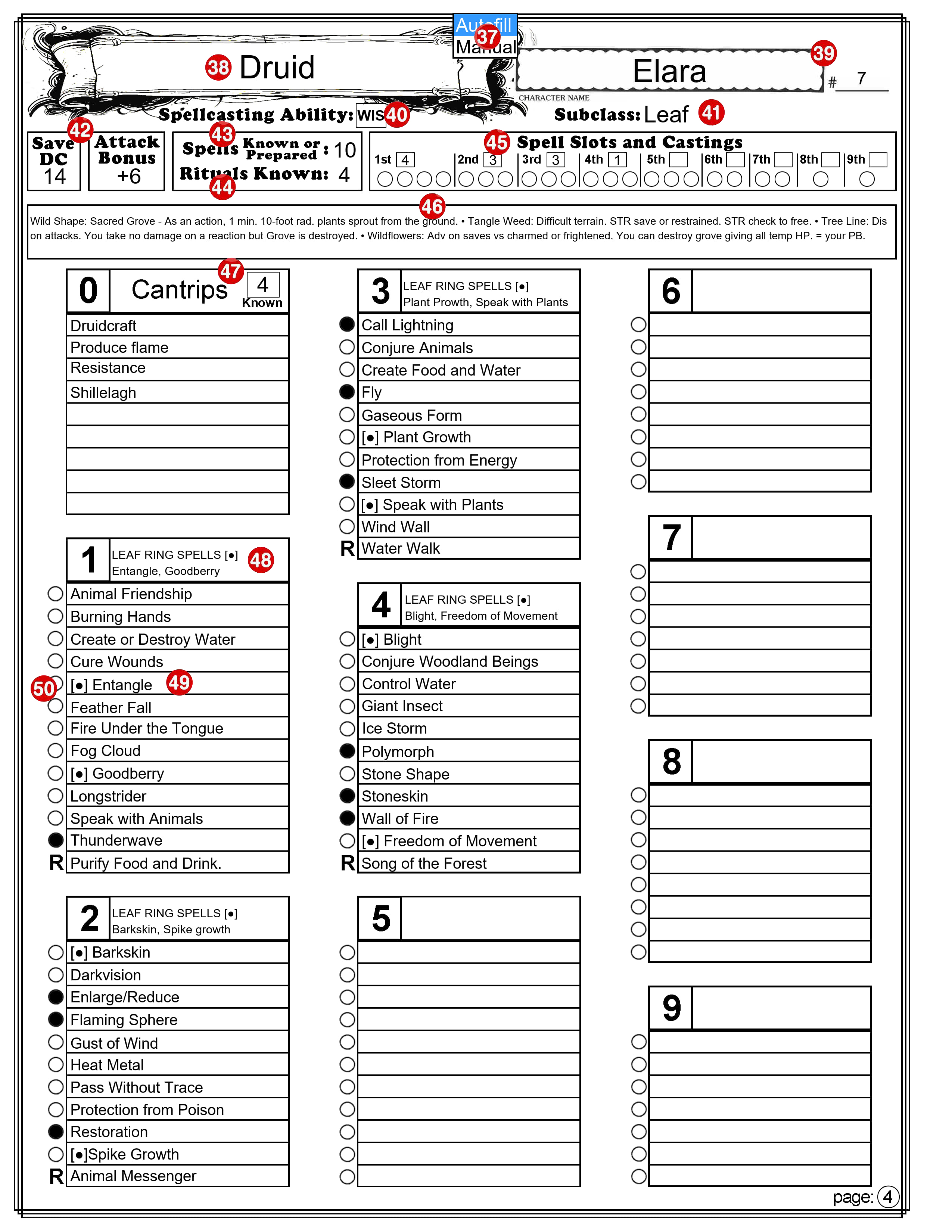
37 – Autofill/Manual Selection Box
This selection box is independent of the similar one on page 1. Be aware that one page might be set to Autofill and the other one set to Manual. Select ‘Autofill’ mode to automatically fill in portions of this page based on your choices, as described below. Choose ‘Manual’ mode to keep existing information unchanged and make your own edits. Note: This selection box will not appear on the printed page.
38 – Your Character’s Class
Autofill mode: Your Character’s Class as it appears on page 1, will be copied here. Manual mode: When you switch this to Manual mode, any text here remains, but you can edit, delete or change it.
39 – Character’s Name and #____
Character’s Name and Character sheet version (see numbers 2 & 3).
40 – Spellcasting Ability
Autofill mode: This will show the ability used by this class of spellcaster. You can’t change the text. Manual mode: You can change the text,
41 – Subclass
Autofill mode: This will reflect the sub-class that is on page 1. Manual mode: The text in this field is fully editable.
42 – Save DC and Attack Bonus
Autofill mode: The spellcaster’s save DC and attack bonus is calculated and displayed here. Manual mode: You can change the number.
43 – Spells Known or Prepared
Autofill mode: If the spellcaster has a limited number of spells they know or that they can prepare, that number is displayed here. You cannot change the number. Manual mode: You can change the number.
44 – Rituals Known
Autofill mode: If the spellcaster can cast Rituals, the number they have available is displayed here. You cannot change the number. Manual mode: You can change the number.
45 – Spell Slots and Castings
Autofill mode: The spellcaster’s number of spell slots is calculated for each spell level and displayed here. You cannot change the numbers. Manual mode: You can change the numbers. Castings: The check boxes are for you to use during your game to check off the spell slots as you use them.
46 – A space for notes
This area is where you can enter notes specific to your spellcasting features and abilities.
47 – Known Cantrips
Autofill mode: The number of cantrips you can know is calculated based on your class level is calculated and displayed here. You cannot change this number. Manual mode: You can change the number.
48 – Another space for notes
This space at the top of the list of spells of each level is for any notes you may want to keep regarding spells of this level.
49 – Spell List
You can enter the name of the spells you have access to for each spell level. You can enter anything you want here. You might want to include the page number where the spell can be found in the PG. I like to include things [C] for concentration. Note: The example character sheet is for a Druid that can cast Leaf Ring spells without preparing them. I have indicated that with this symbol: [●]. This is a standard text filled circle, feel free to copy it from here and past it into any text field on this character sheet.
50 – Prepared Spells
If your Class has you prepare a certain number of spells from your list of spells, you can indicate the prepared spells by filling in the circle (by clicking on it). If you click on it a second time it will be replaced by the letter “R” Use this to indicate a Ritual spell that you know. You don’t have to have a Ritual Spell prepared to cast it. Clicking it a third time returns it to a circle.
Multiclass
To use this character sheet for a multiclass character there are two options.
Option 1. One way is to simply switch to Manual mode and enter everything any way you want. Option 2. To take full advantage of the features available on this character sheet I recommend the following:
Create a level 1 character in Autofill mode. Enter all its weapons, armor, and equipment.
When you are ready to add a second class switch to Manualmode (if you haven’t already).
In the Class box (number 7) add the level for the current class and the name of the second class and its level. For example, if you have a third level Barbarian and add two levels of Sorcerer you might enter its class as: Barbarian,3 Sorcerer,2.
Make changes as required to the other class related features on this section. You can delete anything that no longer applies or that you don’t need to reference.
The Class Feature box (number 11) will change to allow several lines of text. You can use this area to enter information you want to keep track of, or that won’t easily fit in other places on the sheet.
Enter the combined level of all of your classes in the “Level” box (number 12). This is important because many calculated values are based on this.
On page 4, select “Manual” mode and make any needed changes.
Final Comments
The main thing to remember is that the character sheet is yours. Use it in any way that makes sense to you. You can write outside the boxes, use circles and arrows, scribble in the margins, or use it in any way that you choose. Also, you don’t have to completely fill out every box before you start playing. If you never decide on your character’s eye color, it won’t affect the game. [As a DM, I do strongly recommend that you give your character a name before your second gaming session. I have played too many times with one or more “no name” characters. This can be a distraction.]
Here are a couple of tips. First, if you are using a printed character sheet, use pencil instead of ink. Many things can happen during an adventure that can cause things to change so keep an eraser handy. Second, if you can cast spells, you might want to use one or more weapon boxes on page 1 for quick reference to your favorite offensive spells.
Having problems? Occasionally users of my previous Character Sheet would report issues with getting everything to work. The problem has typically been with the PDF reader they are using. Problems with the PDF reader in their browser were common. If you have access to a desktop computer running Windows, I recommend you first download a copy of the file to your hard drive. Then open the file using your preferred PDF reader. The most popular one is the free “Adobe Acrobat” PDF Reader. This Character Sheet has been tested on that and it all appears to work. If you are curious, I created this using PDF-XChange Editor.
Call to action. I’m always looking to improve my resources for the D&D community! I would love to hear your feedback on this new character sheet. Let me know what you think in the comments below. If you encounter any issues using the sheet, please report them so I can address them. And if you have any suggestions for improvement, I’m all ears! Your input helps me create the best possible tools for fellow Dungeon Masters and players.
“A generic trademark, also known as a generalized trademark or proprietary eponym, is a trademark or brand name that, because of its popularity or significance, has become the generic term for, or synonymous with, a general class of products or services, usually against the intentions of the trademark’s owner.” (from Wikipedia) I am not a lawyer. This is simply my observation and is not intended as legal advice.
I believe that “Dungeons and Dragons” and “D&D” have become generic trademarks. Just like people may ask for a “Kleenex” when asking for a facial tissue, they often refer to all role playing games as “Dungeons and Dragons“.
Not long ago, when talking to most people, if I said that I played Dungeons and Dragons, they wouldn’t know what I was talking about. In the last five or so years D&D has exploded in popularity and most people know the name Dungeons and Dragons, even if they still don’t know much about it. However, this is the only role playing game they have heard of and may know very little about it. If you play a different TTRPG (table top role playing game) chances are the average person will have never heard of it.
A conversation may go something like this: “I play _______ every Friday evening.” [Fill in the blank with any TTRPG other than D&D.] “What is that?” “It’s a tabletop role playing game”. “What is that?” “It’s like Dungeons and Dragons.” “Oh, I’ve heard of that. Isn’t that where you sit around a table, roll dice and pretend to fight monsters?” “Yeah, kinda.”
To most people, any game where you sit around a table, roll dice, move little miniature people around and pretend that your character is fighting monsters, is Dungeons and Dragons. And, to tell the honest truth, that isn’t necessarily a bad definition. If you tried to tell your friend what the difference is between D&D and your preferred game it would boil down to your preferred rules. But, the rules aren’t necessary to understand what the game is about, and why we love it.
If you, like me, love fifth edition Dungeons and Dragons, there are most likely some rules that you think need to be changed. You may have some house rules that you use to improve the game. You are probably looking forward to the release of the updated rules that are scheduled to be released this year. You trust that WoTC (Wizards of the Coast) will make changes to improve on the existing rules. When they are released, you will probably switch to playing with the new rules, but you will still be playing Dungeons and Dragons. The same happened when third edition and v3.5 was released. It was all still Dungeons and Dragons.
So what is it when another company takes the Dungeon and Dragons rules (as are available to anyone in the SRD for fifth edition) and makes changes to improve on the existing rules? There is an argument to be made that these versions are still Dungeons and Dragons. Several different companies have done this. Some made major changes and some only added to the basic rules and made minor changes. I say that if you are plying any of these games you are still playing Dungeons and Dragons.
Why does any of this matter?
Many people, myself included, are unhappy with Hasbro, WoTC included, for many things they have done over the last 12 months. So much so that we are uncomfortable giving them any of our money. But we love the current version of Dungeons and Dragons. Of course, we could just continue playing the same game we have been playing for the last 10 years, but the idea of a new improved version is very appealing. So all I am saying is that if this describes you, don’t worry. You can upgrade your version of Dungeons and Dragons to a new and improved version without supporting WoTC. Just switch to one created by a different company. It will still be the same game, but will have changes that the authors think are an improvement. That is the same thing that WoTC is going to be doing with their new release.
I think that the easiest new version to switch to, the one that will be the most like the new version of D&D from WoTC but perhaps even better, is the one that is coming soon from Kobold Press that they are calling Tales of the Valiant. But I am tempted to call D&D 6E.
I haven’t posted much on D&D lately. If you follow this blog you know that after the OGL mess this January I have said that, depending on the Wizards of the Coast’s (WotC) behaviour between now and the time the next version of D&D is released in 2024, and my opinion of that version, I will not be buying any Wizard’s of the Coast products. Here are my latest thoughts regarding this.
I’m still not giving Hasbro [WotC is a subsidiary or Hasbro] any of my money at least until after they release the 2024 version of D&D, if then.
As a side note – they have said that they will not be calling it a new edition but will be referring to the current edition as the 2014 edition of Dungeons & Dragons and the new version as the 2024 edition of Dungeons & Dragons. I agree that, based on the most current play-test, it does look more like a rules update than a new game. For now, I will be referring to it as D&D v5.5
At the current time I like the proposed changes to 5e, but I also like the new game rules that Kobold Press is proposing for their Tales of the Valiant (ToV). The two games will be different from each other, but they will both be based on the current version of D&D with revisions, changes, updates, and new content. They both insist that they will be backward comparable with existing 5e content. So, when the new books come out next year, I have several options. 1) I could ignore both and continue playing 5e. 2) I could believe WotC was censer when they apologized for the Dungeons & Dragons Open Gaming License fiasco, and start using the new v5.5 rule books. 3) I could switch from D&D to ToV or some other RPG (I am leaning toward ToV over the alternatives).
Here are my thoughts:
I am a long time supporter of WotC and I would hate to give up on them by switching to a different gaming company. Hashro’s purchase of them in 1999 didn’t seam to have much effect on WotC until after Chris Cocks became CEO of Hasbro on February 25, 2022. The changes were subtle at first, but they came to a head January this year with the OGL thing.
Hasbro has made it clear that their goal is to get more money from D&D players. They realize that DMs spend much more on WotC products than the players do and they want to get more of the players money. Their plan appears to make D&D primarily an on-line game with the v5.5 Virtual Tabletop (VTT) that they are developing, coupled with D&D Beyond. That way they can charge a monthly fee for each player and offer a lot of customizing options, each of which you can get for a small fee. Even if they make it free for the players to join a game, WotC will still make a lot of money on the micro transactions. And they can offer even more things for the DM to buy, such as 3D objects and tools to create custom 3D dungeons along with animations, special effects, furniture, commoners and monsters.
When I first saw their VTT preview I was excited. It looked great. I thought it would be wonderful to play. But now I am not sure how well that will work for me as a Dungeon Master. First of all I may have to upgrade my PC or get a new one to handle the real time 3D at a decent rate. Perhaps if I stick to playing on-line with adventures that are published by WotC that include all of the 3D maps and monsters, that would work. Especially if it were something like a dungeon crawl where the PCs couldn’t go anywhere off the map. But for me to use it for a home grown campaign or to play one of the many 5e adventures I currently have as a PDF or in a print, the VTT would need to have a 2D ability to draw the encounter map and to import 2D JPG files, something like Fantasy Grounds or Roll20. But if I use their new VTT it will need to be a lot better than the Fantasy Grounds, that I am currently using.
For one thing, I bought a copy of Fantasy Grounds including a copy of the 5e version of the Player’s Handbook, the Dungeon Masters Guide and the Monster Manuel a couple of years ago. This was a one-time purchase which they say will allow me to continue playing with it as long as I want to. With it, for example, I am currently running the “The Age of Worms” adventure path that was published over twelve instalments from July 2005 through June 2006 in Dungeon magazine. I am importing 2D maps that others have drawn and made available on the internet. If the WotC new VTT won’t allow me to do that, I won’t be interested. Also, if there is a monthly fee along with a requirement to link to D&D Beyond with a requirement for another monthly fee for that, those will be strikes against it.
If I decide to not use the new VTT and continue using Fantasy Grounds, I will be surprised if WotC makes a Fantasy Grounds version of the new PHB and MM available for purchase. They seem to be intent on forcing everyone onto their platform.
And, what if I just buy the new D&D 5.5 books, and don’t play on-line or take the time to revise all the rules on my copy of Fantasy Grounds? Up until now, WotC has published Errata for the PHB and others from time to time with corrections and revisions, and include those in the next release of the book. Will they continue to do this? I think that the temptation will to be to make those changes to the on-line versions of those books that you access through the VTT or D&D Beyond and forget about the errata updates. It appears that they are looking at the physical books as only something that collectors will purchase. If they do that, you will only know if you are using the latest rules if you are using Wizards’ VTT, or at least D&D Beyond. I also wouldn’t be surprised if they combine their new VTT with D&D Beyond at some point.
Another thing – when you “buy” a book on D&D Beyond you are not actually buying anything. What you are doing is paying for a “license” to access a copy of that book when you log onto their web platform. If the site goes down, or the company goes out of business, or they simply decide to change the wording of the conditions that you accepted when you clicked on at the bottom of the pages of text that you never read when you “bought” the book, then you will no longer have access to it. If you think that could never happen, look at what they tried to do with the OGL. There is no reason to think that everything that you “buy” on their VTT will be any different. As an example of what they could do instead: A copy of the Fantasy Grounds program exists on my hard drive. When I run it, it links to their on-line site, but it would run even if I were disconnected from the internet. When I purchased Fantasy Ground versions of the D&D books, I downloaded copies of them onto my hard drive. These are similar to PDF files, except they can only be opened with the Fantasy Grounds program, and all the rules, monsters, NPCs, etc. that they contain are available for me to use in Fantasy Grounds. I regularly backup the folder that they are in. Whenever I update Fantasy Grounds, it checks to see if anything else that I have purchased has been updated and will replace them with the newer versions. If Fantasy Grounds were to disappear from the internet, for any reason, I could still link to others site-to-site and continue to play with everything I have purchased. WotC could do something similar if they chose to.
So what am I going to do?
Well, it depends. ⚫ If either v5.5 or ToV becomes obviously head and solders better than the other, I will probably use that one. (I will post a side-by-side comparison once they are both published.) ⚫ If the v5.5 books are not available for Fantasy Grounds, I will probably switch to ToV. I have already supported their Kickstarter and included purchase of the Fantasy Grounds versions of the books.
This is one of several reviews I am doing this year of various table top roll playing games. I am specifically comparing them to D&D 5e. I am doing this with the assumption that my readers are already familiar with D&D 5e. The following review is based only upon my reading of the rulebook. I haven’t played this yet, but I will be posting my opinion after I get a chance to play test it.
Tails of the Valiant is scheduled to release early in 2024. I am basing this comparison on the Tails of the ValiantPreview (that they have labeled final) that I downloaded from their site on July 7, 2023. I may update this when the final version is released. When the 2024 version of Dungeons and Dragons is available I will post a comparison of that with 5E.
I am referring here to the fifth edition of Dungeons and Dragons as 5E and to Tales of the Valiant as ToV. This information is for evaluation purposes, it should not be considered official rules of the game. You can assume things that I don’t list here are basically like 5E with only minor differences.
In ToV the Dungeon Master is called the Game Master.
Summary of the game system
Kobold Press is creating Tales of the Valiant to be compatible with 5E. From their Kickstarter page: “It combines the Creative Commons foundation of 5th Edition with new elements to create a powerful Kobold-style 5E with teeth.” If you know how to play 5E you know how to play ToV, with only a few differences – most of which I will try to summarize here.
Primary differences between Tails of the Valiant and D&D 5e
Character Creation
Choose a Class
Note your Hit Die size
If you have spellcasting, mark your available spell slots and spells known (if applicable)
Any skills you are proficient in
Any equipment and tools you are proficient with
Saves you are proficient with
Your Proficiency Bonus (PB)
Your starting equipment [you may also get additional equipment based on your background]
Determine Ability Scores and use them to calculate the following:
Your hit-point total
Your spell save DC and your spellcasting attack modifier (if applicable)
Choose your lineage and heritage, including:
Your size
Your senses
Your base movement speed (or speeds, if applicable)
Any additional proficiencies
Select or create a background, including:
Any skill or tool proficiencies
Your languages
Your talent
Any additional starting equipment
Your adventuring motivation
Set your Luck points to 0
Come up with a name and basic description
Classes
The rules preview includes the iconic Cleric, Fighter, Rogue, and Wizard. When released, ToV should include the 12 core 5e classes plus the Mechanist. It will also include more subclasses and all classes get their subclass at 3rd level. The preview only includes the class progression through 5th level. As an example, here are the major differences in the Rogue Class between ToV and 5E. These are still in beta testing and may change before the final version is published.
Rogue
Hit Points: Same as 5E, except 1d8 (or 4) + your CON modifier per fighter level after 1st [in 5E it is 1d8(or 5).]
Proficiencies, Weapons, Tools, Skills, Saves, and Starting Equipment: Same as 5E
1st Level Features
Expertise: Same as 5E
Sneak Attack: Same as 5E
Thieves’ Cant: Same as 5E
2nd Level Feature
Cunning Action: Same as 5E
3rd Level Feature
Roguish Specialty: called “Roguish Archetype” in 5E – select one form the following:
Enforcer: You get the following features if you choose “Enforcer”:
Ambush: During the first round of combat, you have advantage on the first attack roll you make against any creature involved in the combat. Additionally, whenever you make a successful attack roll against a creature with the surprised condition, that attack is automatically considered a critical hit.
Cold-Blooded: Once per turn when you reduce a creature to 0 hp with a weapon attack, you can use the same weapon to immediately make a weapon attack against a different creature you can see within your weapon’s range. You can’t add Sneak Attack damage to this additional attack.
Expanded Talent List: When you gain a new talent, you can select that talent from the Martial or Technical Talent list. (Refer to Talents)
Thief: You get the following features if you choose “Thief::
Fast Hands: You can use the bonus action granted by your Cunning Action to do any of the following:
Make a DEX (Sleight of Hand) check
Use thieves’ tools to attempt to disarm a trap or open a lock
Take the Use an Object action
Second-Story Work: gives you the following features
You gain a climb speed equal to your base movement speed. If you already have a climb speed when you gain this feature, it increases by 10 feet.
When you make a long jump, you cover a number of feet equal to your walking speed if you move at least 10 feet on foot immediately before the jump. When you make a standing long jump, you can leap half your walking speed. Either way, each foot you clear on the jump costs a foot of movement.
In the event a STR (Athletics) check is required to clear or extend a jump, you can choose to make a DEX (Acrobatics) check instead.
4th Level Feature
Improvement: Add 1 point to any ability and get a Talent. (Refer to Talents)
5th Level Feature
Uncanny Dodge: Same as 5E
Talents (Called Feats in 5E)
Talents are not an optional rule in ToV.
Talent Categories: Talents are divided into three categories: magic, martial, and technical.
At Level 1: Your background gives you one Talent.
At Class Ability Score Improvement: When your class level gives you an Ability Score Improvement you improve an ability by one point and choose a talent from a specified list.
Ability Scores
Abilities and Modifiers
Same 6 abilities, and the modifiers are the same as 5E.
Player Characters can’t have an ability score higher than 20.
Ability Scores start out slightly higher in ToV
The standard array numbers are 16, 15, 13, 12, 10, and 8. (They are 15, 14, 13, 12, 10, and 8 in 5E)
Point buy works the same as 5E but you start with 32 points rather than 27 and you can purchase a score of 16, 17, or 18 at the cost of 11, 13, or 16 points respectively.
Roll 4 d6’s and discard the lowest, is just like in 5E but when you have finished, add 2 to one score of your choice that is 16 or below and add 1 to one score of your choice that is 17 or below.
Lineage and Heritage (Race in 5E)
ToV splits what would be your Race in 5E into the traits you get from your biological parents (your Lineage) and those you get from upbringing (your Heritage). You select both your Lineage and your Heritage separately. You could have a dwarf who was raised by elves, for instance.
Lineage
Among other traits, your Lineage affects your age, size and speed.
The Lineages in the preview packet are Beastkin (like a half man/half beast of some kind), Dwarf, Elf, and Human. We know there will be all of the races that are in 5E plus Kobold and perhaps more.
If you want a character that reflects common fantasy archetypes, each Lineage has a couple of recommended Heritages.
Heritage
The languages you know are determined by your Heritage, not your Race as in 5E.
Many of the traits and features you get from your background in 5E – you get from your Heritage in ToV.
Your Heritage affects your cultural elements, such as folklore, traditions, and natural environment.
Background
Different from your Background in 5E, this is a backstory explaining why your character has chosen to become an adventurer.
They have omitted personality traits, ideals, bonds, and flaws.
You can select one of the provided Backgrounds, with advice on customizing it to better fit your character or campaign.
Each Background includes an Adventuring Motivation. You are encouraged to modify it, or create your own. Your Adventuring Motivation provides you with the following:
Proficiency in two skills
Proficiency with one or more tools or additional languages.
Starting equipment
One talent.
Luck (replaces 5E’s Inspiration)
You receive one luck point when you fail an attack roll or save and the GM can give you a luck point whenever he chooses.
You can have a maximum of 5 Luck points.
If you have 5 Luck points and would gain a sixth, you roll a d4 and reset your Luck points to that number.
Unless you have rolled a natural 1, you can spend one of more of your Luck points to add to any d20 roll you make. Or you can spend 3 Luck points to re-roll a d20.
Luck can’t create a natural 20.
Spells
Spell Circles: There is not a separate list of spells for each class. Instead the spells are divided into Circles (arcane, divine, primordial and wyrd). A few spells are included in two or more circles. Your classes will get spells from a specific circle.
Spell Rings: This is just a name change. ToV calls spell levels spell rings instead. [I can see where this will be less confusing to new players.]
Ritual Spells: In 5E certain spells can be cast as a ritual if your class allows you to cast rituals. In Tov they have been moved into a separate type of spell, a Ritual Spell.
For each spell circle, rituals are listed separately from the other spells.
Ritual spells take 1 minute or longer to cast.
Ritual spells don’t use spell slots and can’t be cast at higher rings.
When applicable, your class progression table will have columns for: cantrips known, spells known, rituals known, 1st ring spell slots, 2nd ring spells slots, etc.
Monsters
The Preview includes a few monsters that will be in the ToV Monster’s Vault. I am showing the ToV and 5E stat block for the Goblin side by side for you to see how they differ.
Challenge Rating and XP: ToV shows these at the top – to the right of the monster’s name.
Alignment: The Tov preview doesn’t mention alignment. It appears that they will not be using it for monsters or PCs.
Hit Points: ToV lists the monster’s hit points. 5E shows this as the average number and also shows the die expression used to generate a range of hit points.
Stealth: Tov lists a stealth number for all monsters (15 for the Goblin). Your character must make a Perception check of this or higher to notice the monster if it is trying to hide. 5E lists this as one of the monster’s skills (+6 for the Goblin).
Perception: Tov lists this for every monster (9 for the Goblin). Your character must make a Stealth check of this or higher to sneak past it. 5E lists this as passive Perception for one of the monster’s Senses. [Notice that this changes from the monster doing a perception check to the PC making a Stealth check. In my 5E games I have the player make a stealth check when his PC can hide and later have the monster make a perception check when it might possibly notice him. Doing it the ToV way simplifies and should speed up play.]
Proficiency Bonus: This is not included in the monster stat block in the 5E Monster Manual. [Wizards has started including this in their more recent publications.]
Ability Modifiers: ToV only lists the ability modifier and does not also include the ability score. [This may take a little getting used to but I understand simplifying the stat block. Also, ToV is using the stat modifier to do more.]
For any save or ability check, roll a d20 and add the relevant ability modifier.
Bonus Actions: ToV moves anything the Monster can do with a bonus action to this section. (Nimble Escape in the case of a Goblin.)
Reactions: ToV moves anything the Monster can do with a reaction to this section. (ToV has added Frantic Reflexes to their version of the Goblin.)
Immunities, Resistances, and Vulnerabilities: ToV doesn’t use multiple lines that separate out damage and conditions. For example if a creature is immune to fire damage and the charmed condition, both appear in the Immune line.
Immune
A monster that is immune to a kind of damage takes no damage from it.
A monster that is immune to a condition can’t be affected by it.
Resistant
A monster that is resistant to a kind of damage takes half the damage (rounded down) from it.
A monster that is resistant to a condition has advantage on saves to avoid it.
Vulnerable
A monster that is vulnerable to a kind of damage takes double damage from it.
A monster that is vulnerable to a condition has disadvantage on saves to avoid it.
What you need to get started
All you will need will be the Tales of the Valiant Player’s Guide. The Game Master may also want to have the Tales of the Valiant Monsters Vault. There will be no required Game Master’s Guide. Their CFR (Core Fantasy Roleplaying) rules will contain all the basic rules and will always be available as a free download.
Final Thoughts
Quoting from their web site: “ToV moves the independent 5th Edition community forward with a system that is open and available to all … Our goal is to keep 5E products vibrant, both in print and on VTT partner platforms, by keeping a set of rules available under an open, perpetual, and irrevocable license.” Where Wizards of the Coast has their SRD (System Reference Document), Kobold Press will have their CFR (Core Fantasy Roleplaying) rules, which will contain the basic ToV rules. They have also indicated that they intend to be publishing their CFR under the ORC (Open RPG Creative) license, rather than Wizards of the Coast’s OGL (Open Game License). The ORC and the OGL are both public copyright license systems. Where the OGL was created by Wizards of the Coast for publishers to use when using elements of their SRD, the ORC is an agnostic, perpetual, irrevocable open gaming license created and made available to all by Paizo. Wizard’s attempt to change their OGL (in a very bad way) earlier this year prompted Kobold Press to create Tales of the Valiant.
I am a big fan of Kobold Press. I have several of their books. I fully expect their Tales of the Valiant to be at least as good, and most likely better, than Wizards of the Coast’s new version of D&D (that they now say they will be calling D&D 2024). For one thing, Kobald Press isn’t hampered by WotC’s need to keep all the rules basically the same as the current version with “enhancements”, where Kobold Press is making a brand new RPG that will be compatible with 5E. This allows them to re-think the way “Races” work and come up with new ones. The same is true with Classes and sub-classes, the spells, and all of the rules. They don’t need to make theirs compatible with all of the sourcebooks that WotC has published. Their goal isn’t to keep all the rules the same, but to make them “better” where they can and try to make everything so that it can still be used with their published adventures and campaign settings. There are no game designers that I think are better up to this task than Kobold Press.
Kobold Press successfully ended their ToV Kickstarter (June 23, 2023) with over $1,000,000.00 pledged. Congratulations! I’m looking forward to receiving my stuff early in 2024.



















 Dungeon Master Assistance